
Our own product · Home & productivity
Sincewhen: Offline-First Recurring Task App
A chore tracker that counts time since each task was last done instead of calendar dates, so the most neglected room stands out at a glance.
- Industry
- Home & productivity
- Timeline
- A weekend (v1)
- Year
- 2026
- Platforms
- Web
Results at a glance
The challenge
- Calendar-style reminders fit upkeep badly: a task done late should restart its clock from the day it was done, and "2 months" is not 60 days. Dates also had to survive time zones and daylight saving without shifting by a day.
- Ranking had to be fair across very different tasks. Sorting by days overdue buries a neglected daily task under a slightly late yearly one, and coloring rooms by percentage makes a room with one overdue task look worse than a room with three.
- With no server, the browser is the database. Safari deletes a site's data after 7 days without a visit, storage can fail or be corrupted, and one bad record could make the whole save file unreadable.
- The app had to open and work with no network, including pages the user had never visited, and keep working across deployments without piling up old cached files.
- The colors carry the meaning, so they had to stay readable: an empty app passes contrast checks that a real one, full of overdue tasks, fails.
About the project
Sincewhen is a progressive web app for recurring upkeep: changing filters, cleaning rooms, servicing equipment. Instead of fixed calendar reminders, each task comes due a set interval after it was last actually completed, then stays at the top of the list until it is done. Tasks are organized into locations, rooms and sub-tasks, and color-coded by urgency so the most neglected room stands out. It runs entirely in the browser with no account or server, works offline, and moves between devices through a backup file, saved to the phone or sent from its share sheet.
What we delivered
Scope
- Product design
- Installable, offline-first web app
- Scheduling and ranking rules
- Nested data model
- Backup & restore
- Accessibility
- Landing page
- Automated testing
What it does
Organized like folders
Locations or categories (Home, Work, Cleaning) hold rooms, rooms hold tasks and sub-rooms, and any task can be broken into sub-tasks. The same chore can have a different frequency in each room: the main bathroom monthly, the guest bathroom quarterly.
Urgency is relative, not absolute
Tasks are ranked by how far through their own interval they are. A daily task two days late outranks a yearly task two weeks late.
Color tells you where to look
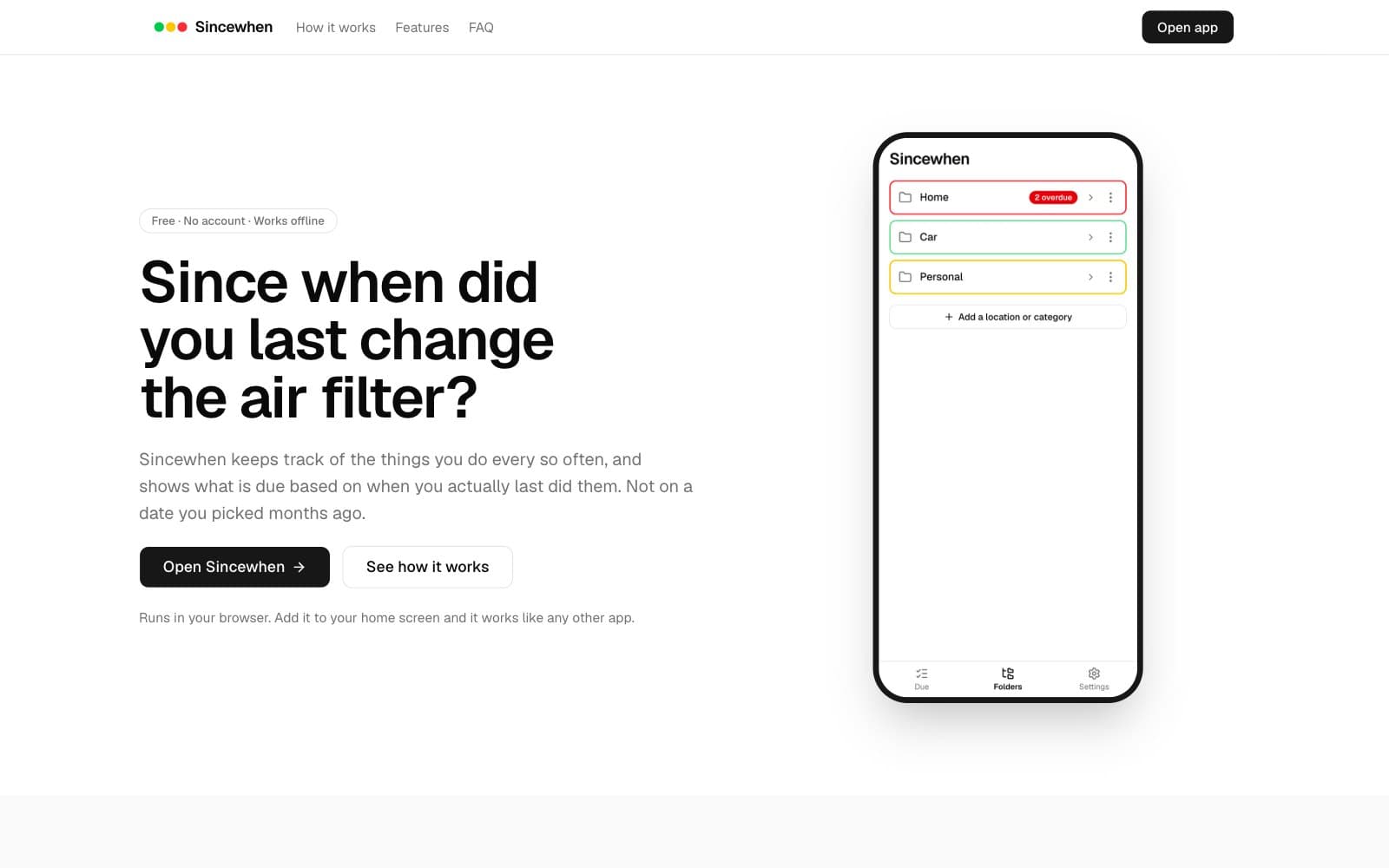
Tasks go green, yellow, red, then a red border and "!" when badly neglected. Rooms roll their contents up into green, yellow, orange, red and dark red, with a count of what is overdue inside, so the worst room is obvious at a glance.
A "Due" screen across everything
One flat list of what needs attention everywhere, most urgent first, filterable by location. The app can open on it, or on the folders.
Smart completion
Finishing "clean the bathroom" also finishes its sub-tasks that were due, but leaves a yearly "regrout" alone. Finishing the last outstanding sub-task completes the parent. Every completion can be undone.
Starts with an example setup
A short intro explains the idea, and "Start with examples" fills an empty app with common chores, dated so every color shows on the first day.
Fits the device and the person
Light, dark, or match the device (following it at sunset), a larger text size, and on a tablet or computer the lists spread into columns.
Private by design
No account, no server, no tracking. Data lives on the device. A backup file can be saved to the phone or sent through its share sheet, and restored on another device. The Due screen suggests a backup once the last one is 30 days old.
Installs like an app
Add it to the home screen and it opens full-screen and works with no network. The first visit caches every screen, including the ones not yet opened.
Our approach
Modeled time as local calendar dates with calendar arithmetic, never timestamps or day counts. A task's urgency is elapsed time divided by its own interval, which makes every frequency comparable.
Rooms are colored by a count of overdue tasks (a badly neglected task counts double, and a parent task counts once for its sub-tasks), and one function feeds both the room badge and the Due list so they can never disagree.
Treated saved data as untrusted input: every load and every import passes the same schema and tree-integrity checks, every new or edited record is validated before it is stored, and unreadable data is preserved and surfaced to the user instead of being silently overwritten.
Wrote a small, readable service worker: pages are network-first, hashed build files are cache-first, and each deployment gets its own cache that replaces the previous one only after it is complete. Every route is static, with the item id in the query string, so one cached page serves every item offline.
Measured accessibility with realistic data loaded, in both light and dark mode, and fixed the colors until every screen passed.
Inside the project
Select a screenshot to view it full size.
Folders, a room and the Due list, colored by what is overdue (the app's example chores)
Dark mode, which can follow the phone's setting
The landing page explains the app before anyone opens it
The outcome
- A complete v1 went from first commit to live in one weekend (2026-09-19 to 2026-09-20), with no account to create and no backend to run or pay for.
- Accessibility went from 96 to 100 on the screens that show overdue tasks, measured on the live site with tasks loaded, in light and dark mode.
- Backup and restore verified on a real iPhone: the backup file saves to the Files app and restores from it.
- 147 automated tests cover the scheduling, ranking and completion rules, the saved-data checks and the backup format. The production build was also tested in a headless browser, including opening never-visited screens offline and upgrading between two deployments.
- Built for a future sync layer: storage sits behind one swappable interface, and each record maps to one database row.
- All 9 pull requests went through automated code review: 36 findings, 28 fixed (the logic fixes with regression tests), 7 declined and 1 withdrawn by the reviewer.
- Built with an AI coding assistant, with every rule covered by tests and every pull request reviewed.
Built with
 Next.js
 React
React TypeScript
 Tailwind CSS
 shadcn/ui
- Zustand
 Zod
Zod date-fns
- TanStack Form
 Service Worker (PWA)
 Vitest
 Vercel
More projects like this

Have a project like this in mind?
Tell us what you're building. We'll show you how we'd approach it and what it would take, the same way we did for our own product.